Introduction: The Challenge of Government Service Centers
Anyone who has visited a Department of Motor Vehicles (DMV), passport office, or city hall knows the experience: long queues, repetitive questions, frustrated citizens, and overworked staff. Government service centers face a universal challenge – high visitor volumes with limited resources. A typical front‑desk agent answers the same question (“What documents do I need for a passport renewal?”) dozens or even hundreds of times per day. This leaves little time for complex cases, and citizens endure long waits.
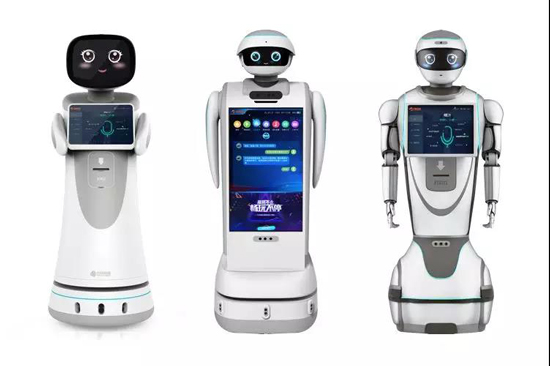
Enter reception robots. These autonomous, AI‑powered machines are increasingly deployed in public sector facilities to handle triage, answer FAQs, manage queues, and streamline document checks. But where exactly are reception robots used, and what impact do they have?
This article explores the primary deployment locations for reception robots in government service centers, quantifies their benefits (shorter queues, reduced staff burden), and provides a framework for agencies considering automation.
Where Are Reception Robots Used? Primary Locations in Government Facilities
Reception robots are not one‑size‑fits-all. Their placement within a government facility determines their effectiveness. Based on real deployments across Europe, North America, and Asia, three locations consistently deliver the highest ROI.
Main Entrance – Visitor Triage and ID Scanning
The main entrance is the most common and impactful location for a reception robot. Positioned just inside the doors, the robot serves as the first point of contact.
Key functions at this location:
-
Greeting visitors and asking the purpose of their visit (e.g., “license renewal,” “passport application,” “property tax payment”).
-
Scanning IDs (driver’s license, passport, national ID card) and verifying appointments.
-
Directing citizens to the correct service window or department.
-
Printing queue tickets or sending SMS notifications when their turn approaches.
Benefits:
-
Reduces the initial bottleneck at the human information desk.
-
Captures visitor data for capacity planning (anonymized).
-
Prevents citizens from joining the wrong queue, reducing rework.
Real example: A city hall in the Netherlands deployed a reception robot at its main entrance. Within three months, the average time to direct a visitor to the correct window dropped from 3 minutes (human) to 45 seconds (robot). The human receptionist was redeployed to handle complex citizen cases.
Waiting Areas – Queue Status and Information
Once citizens are checked in, they typically wait in a seating area. A second robot (or the same robot if it can roam) stationed in the waiting area provides ongoing value.
Key functions at this location:
-
Displaying real‑time queue status and estimated wait times.
-
Answering FAQs about required documents, fees, and processing steps.
-
Providing entertainment or public service announcements to reduce perceived wait time.
-
Alerting citizens when their number is called (via screen or SMS integration).
Benefits:
-
Reduces anxiety – citizens feel informed and in control.
-
Lowers the number of people approaching the service desk to ask “how much longer?”
-
Improves accessibility for visitors who cannot stand in line.
Statistic: A study of a passport office in Singapore found that deploying a reception robot in the waiting area reduced “walkaways” (citizens leaving due to long waits) by 28%. Perceived wait time dropped by 40% even though actual wait time remained unchanged – because citizens were engaged and informed.
Service Window Adjacent – Pre‑Submission Assistance
The most advanced deployment location is immediately adjacent to service windows. Here, the robot assists citizens before they meet a human agent.
Key functions at this location:
-
Checking document completeness (e.g., scanning forms for missing fields).
-
Collecting basic information to pre‑fill digital forms.
-
Verifying that photos meet requirements (e.g., passport photo size and background).
-
Flagging missing documents so citizens can retrieve them before reaching the window.
Benefits:
-
Reduces per‑transaction time by 20–40%.
-
Minimizes frustrated “I have to come back tomorrow?” moments.
-
Increases agent throughput without hiring more staff.
Real example: A DMV in California piloted a pre‑submission robot for driver’s license renewals. Citizens scanned their forms and ID before seeing an agent. The robot detected missing signatures or expired documents in real time. The result: average transaction time dropped from 12 minutes to 7 minutes, and the number of incomplete applications reaching the window fell by 65%.
Key Capabilities of Reception Robots in Government Settings
Not every reception robot is suitable for government environments. Agencies should look for these essential features:
-
ID scanning and facial recognition – Must comply with local data privacy laws (GDPR in Europe, CCPA in California). On‑device processing is preferred over cloud uploads.
-
Multilingual support – Government centers serve diverse populations. Support for 5–10 languages is typical.
-
Queue management system integration – The robot must communicate with existing digital queue displays and ticketing systems.
-
Secure data handling – No storage of personal information without explicit consent. Automatic data deletion after the session.
-
Remote software updates – Regulations change (e.g., new passport form). Robots must update overnight.
-
Accessibility features – Voice interaction for visually impaired, adjustable screen height for wheelchair users, and large buttons for elderly visitors.
Real‑World Impact: Reducing Queues and Repetitive Questions
The benefits of reception robots extend beyond efficiency. Let’s examine two key impact areas.
Queue Time Reduction
A typical government service center processes 300–500 visitors daily. Before automation, a human receptionist handles 30–50 seconds per visitor. With a robot, that time drops to 10–15 seconds – because the robot never tires, never needs a break, and can process two visitors simultaneously (one via touchscreen, one via voice).
Example calculation (500 visitors/day):
-
Human receptionist: 500 × 40 seconds = 20,000 seconds (5.5 hours) of reception time.
-
Robot: 500 × 12 seconds = 6,000 seconds (1.7 hours) – plus robot never takes lunch.
-
Result: The equivalent of 3.8 additional reception hours per day, redeployed to complex case handling.
Staff Burden Relief
Front‑desk agents in government centers report that 60–80% of inquiries are routine FAQs: “Where is the restroom?” “What forms do I need?” “Do you accept credit cards?” “How long will it take?”
A reception robot with a well‑trained knowledge base can answer 70–90% of these questions autonomously. Agents are then free to handle exceptions, complex cases, and citizen escalations. Staff satisfaction improves because they spend less time repeating themselves.
Real feedback from a city hall in Germany: “Our front desk team was burning out. After deploying two reception robots, they now have time for the difficult cases, and they actually enjoy coming to work. The robots handle the boring questions.”
Citizen Experience Metrics
-
Reduced walkaways: Citizens less likely to leave due to long, uncertain waits. One UK passport office reported a 32% drop in walkaways after robot deployment.
-
Higher satisfaction scores: Post‑deployment surveys showed a 22‑point increase (on a 100‑point scale) in “ease of finding information.”
-
Accessibility wins: Elderly visitors who struggle with reading small signs find voice interaction intuitive. Non‑native speakers appreciate the multilingual support.
Cost‑Effectiveness of Reception Robots in Government Centers
For government agencies operating on tight budgets, ROI is critical. Here is a realistic financial model for a mid‑sized service center (300 visitors/day).
| Cost Item |
Amount |
| Reception robot (purchase, turnkey) |
€25,000 |
| Annual maintenance (lamps, sensors, software) |
€4,000 |
| Annual electricity |
€500 |
| Total 5‑year cost |
€25,000 + (€4,500 × 4) = €43,000 |
Labor savings (conservative):
-
One front‑desk staff FTE (fully loaded in Western Europe): €50,000/year.
-
Robot reduces need for 0.6 FTE (60% of a receptionist’s time freed up).
-
Annual labor savings: €30,000.
-
5‑year labor savings: €150,000.
-
Net 5‑year benefit: €150,000 – €43,000 = €107,000.
-
Payback period: €25,000 ÷ €30,000 = 10 months.
Even accounting for training, integration, and unexpected repairs, payback rarely exceeds 18 months. For government centers with higher visitor volumes, payback can be as short as 6 months.
Where to Deploy First? A Prioritization Framework
For agencies planning a phased rollout, use this framework:
| Location |
Impact on Wait Times |
Implementation Difficulty |
Recommendation |
| Main entrance |
High – triage affects whole center |
Medium – requires ID scanner integration |
First priority |
| Waiting area |
Medium – reduces perceived wait |
Low – standalone, no integration needed |
Second priority |
| Service window adjacent |
High – reduces transaction time |
High – requires integration with agency systems |
Third priority (pilot only) |
| Outside building (weatherproof) |
Low – low foot traffic |
High – ruggedization needed |
Not recommended |
Most successful deployments start with one robot at the main entrance, then add a second in the waiting area after 3–6 months.
Potential Challenges and Solutions
Citizen Acceptance
Some citizens, especially elderly or non‑tech‑savvy visitors, may be hesitant to interact with a robot. Solution: Offer a hybrid model – the robot is available, but a human receptionist is also present (perhaps at a reduced staffing level). Over time, as citizens become familiar, the human can move to a back‑office role.
Data Privacy Concerns
Government centers handle sensitive personal information. Solution: Use robots with on‑device processing only – no cloud uploads. ID scans are used for verification but not stored. Comply with GDPR/CCPA by posting clear signage and offering opt‑out (citizens can go directly to a human).
Technical Reliability
A broken robot is worse than no robot – it creates frustration. Solution: Choose robots with remote monitoring (vendor can diagnose issues before they cause downtime) and redundant systems (e.g., two touchscreens, backup navigation sensors). Keep a spare unit on site for high‑volume centers.
Language and Literacy Barriers
Government centers serve diverse populations, including those who cannot read well. Solution: Robots must support voice interaction in multiple languages, plus simple icons on the touchscreen. Test with real users before deployment.
FAQs About Where Reception Robots Are Used
Q1: Can reception robots handle sensitive personal information like ID numbers?
Yes, but with strict safeguards. Most government‑grade robots scan IDs for verification only – they do not store the data. Some use on‑device processing with automatic deletion after the session. Always choose a robot that complies with local data privacy laws (GDPR, CCPA, etc.).
Q2: Do citizens actually use reception robots, or do they ignore them?
Deployment data shows 70–85% adoption rates when robots are placed visibly at the entrance and staff encourage their use. Hybrid models (robot + human option) achieve the highest satisfaction because citizens can choose their preferred channel.
Q3: How long does it take to deploy a reception robot in a government center?
For a basic triage and FAQ robot (no deep system integration), deployment takes 2–4 weeks including mapping, knowledge base setup, and staff training. Integration with queue management systems adds 2–4 weeks.
Q4: What happens if the robot malfunctions?
Most vendors offer remote diagnostics and 24‑hour onsite service for critical issues. For high‑availability centers, keep a spare robot or have a fallback manual process. Many robots have redundant navigation sensors and auto‑reboot capabilities.
Q5: Are reception robots accessible for citizens with disabilities?
Yes, if selected properly. Look for robots with voice interaction (for visually impaired), adjustable screen height or wheelchair‑accessible design, large touch targets (for motor impairments), and multilingual support (for non‑native speakers). These features are standard on government‑targeted models.
Q6: Can reception robots be used outdoors in front of government buildings?
Some ruggedized models are weatherproof and can operate outdoors (e.g., for after‑hours document drop‑off). However, most government centers deploy them indoors because outdoor deployment requires higher maintenance (dust, rain, temperature extremes) and security considerations.
Q7: How much does a reception robot cost for a government agency?
Purchase prices range from €15,000 to €40,000 depending on features (ID scanner, multilingual, queue integration). Annual maintenance is typically €2,000–6,000. Leasing (RaaS) is also available at €500–1,500 per month including support.
Q8: Where can I see real examples of reception robots in government service centers? Visit
https://en.ibenrobot.com/ for case studies from city halls, DMVs, and passport offices across Europe and Asia. Request a live demo or site visit to see a robot in action.
Conclusion
Reception robots are no longer a futuristic concept – they are actively deployed in government service centers worldwide. The primary locations where reception robots are used include main entrances (for triage and ID scanning), waiting areas (for queue updates and FAQs), and service window adjacencies (for pre‑submission checks).
The benefits are measurable: reduced queue times, lower staff burnout, improved citizen satisfaction, and payback periods under 12 months. For government agencies facing budget constraints and rising service expectations, reception robots offer a practical, scalable solution.
The key to success is starting with a pilot at the main entrance, choosing a robot with strong data privacy and accessibility features, and offering a hybrid human‑robot model to ease citizen acceptance.
Government service centers that embrace reception robots today will be the ones citizens praise tomorrow – for short waits, clear information, and respectful, efficient service.
Ready to Improve Your Government Service Center?
IBEN provides reception robots specifically designed for government environments – with GDPR compliance, multilingual support, and seamless queue integration. Visit
https://en.ibenrobot.com/ to request a free consultation, case studies, or a live demonstration.